Happy anniversary, LÖVE Sam
Endgame
On the day of our anniversary, I tried to quickly wrap up the project in the morning.
First, I wanted to animate a fadeout for the game while having the ending cutscene text remain on screen. I tried setting the graphics draw color to black with a gradually increasing alpha value, then drawing a window-sized rectangle over the screen. I drew the rectangle after the game objects but before the text, to keep the text above the fade.
-- main.lua
function love.draw()
	love.graphics.setColor(0, 0, 0, alpha)
	love.graphics.rectangle("fill", 0, 0, love.graphics.getWidth(), love.graphics.getHeight())
end
However, this approach was giving me a lot of visual issues.
I took a break and went for a walk and thought over some of the possible causes for the visual bugs. I realized it might be because I wasn't resetting the draw color after rendering the rectangle. After getting back from my walk, I updated my code and the fadeout worked perfectly!
-- main.lua
function love.draw()
	local r, g, b, a = love.graphics.getColor()
	love.graphics.setColor(0, 0, 0, alpha)
	love.graphics.rectangle("fill", 0, 0, love.graphics.getWidth(), love.graphics.getHeight())
	love.graphics.setColor(r, g, b, a)
end
With the fadeout and camera transformations, I felt the game had a pretty smooth looking end cutscene.
Music
For the final part of the project, I wanted to add a couple background music tracks. Luckily for me, I had exactly 0 experience making music. I wanted the music to fit the retro feel of the game, and found this great website called BeepBox. First, I made a short background track, which I was pretty happy with given how quick I was able to create it. I exported the .wav file and loaded it into LÖVE. I also configured the music to loop once played.
-- main.lua
local music = love.audio.newSource("ambient.wav", "stream")

function love.load()
	music:setLooping(true)
	music:play()
end
For some reason, the looping appeared to have no effect. I looked around but couldn't find any issues with the setLoop() function. I tried exporting the music to other file formates, but nothing seemed to work. Then, when exporting the music, I saw that there was a default option checked in BeepBox called "outro". After unchecking this box, and reloading the music file, the looping finally worked as expected.
Final touches
With the gameplay mechanics, ending cutscene, and music done, I was almost done with the project. I felt the plain green background color needed improving, and I wanted to replace it with randomly generated grass tiles. Luckily, this was pretty easy to accomplish. I just copied the random grass terrain generation logic from my world object and set the program to fill an area slightly larger than the player's viewport with the randomly generated grass. I also tweaked the grass generation so plain grass tiles were chosen more frequently than flowering grass tiles.
I had a little extra time before I wanted to present the game to my partner, so I decided to quickly extend my tile system and create some animated water tiles. I followed the same process for implementing a new tile type, but every second I had the draw() function switch which water tile was rendered in the water pools.
I also chose an retro, arcade-style font, but chose not to include that in the version on GitHub since I'm not quite sure about the licensing (one day I would love to learn enough to make my own font).
Finally, I wrapped up the project by designing a few more grass and wall tile variations. I was very happy with the final product and was excited to present it to my partner!
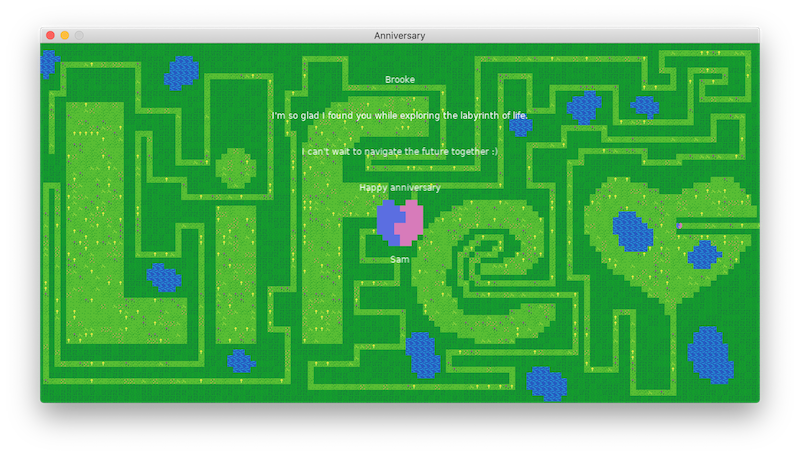
Apart from thinking she was walking through a small intestine, being confused by the heart-blob character, and generally not being a fan of pixel art graphics, she loved it!
Closing thoughts
Overall, I really liked working with LÖVE. I was impressed with how quickly I was able to create a working (albeit very simple) game. While I really enjoyed using it for this project, Lua's lack of objects makes me unsure if the engine would work well with larger-scale games. Additionally, the lack of sprite z-positioning adds extra complexity to the draw function, and the absence of a built in camera object surprised me.
That being said, the engine was definitely easier to learn compared to a more full-featured engine like Unity. There was a lot of convenient default functionality provided, such as being able to play looping music or load in and draw a sprite in just a few lines. I definitely hope to experiment more with LÖVE and felt it was an execellent engine choice for this project.
I hope you enjoyed this devlog series. I'll definitely write more in the future on projects to come! If you want to look more closely at the code or run/build off of Anniversary yourself, make sure to check out the repository!